
Code Marker#
The code marker is an aruco marker, a special fiducial tag. This means that not only is the marker designed to be easy and robust to detect, it also contains a code number. Therefore the code marker enables an association of trajectories with other data, e.g. questionnaires. However, the code marker needs a comparatively high resolution. We recommend testing the detection of code markers with the camera that is going to be used and the same distance between camera and code as in the experimental setup.
Marker Options#
The options for the code marker are entirely contained within the parameter dialog of the marker.

The option dialog for the code marker.#
The code marker has a lot of options and it is beyond the scope of this documentation to explain all of them. We refer to the documentation of OpenCV for a more detailed explanation of the parameters (also accessible via the more infos... button in the parameter dialog).
Tip
In our experience the adaptive thresholding window parameters are very influential
Important
Select the correct dictionary! It needs to match the dictionary used to print out the codes.
The only option that is unique to PeTrack is show detected candidates. When this checkbox is enabled, all candidates are drawn onto the screen.
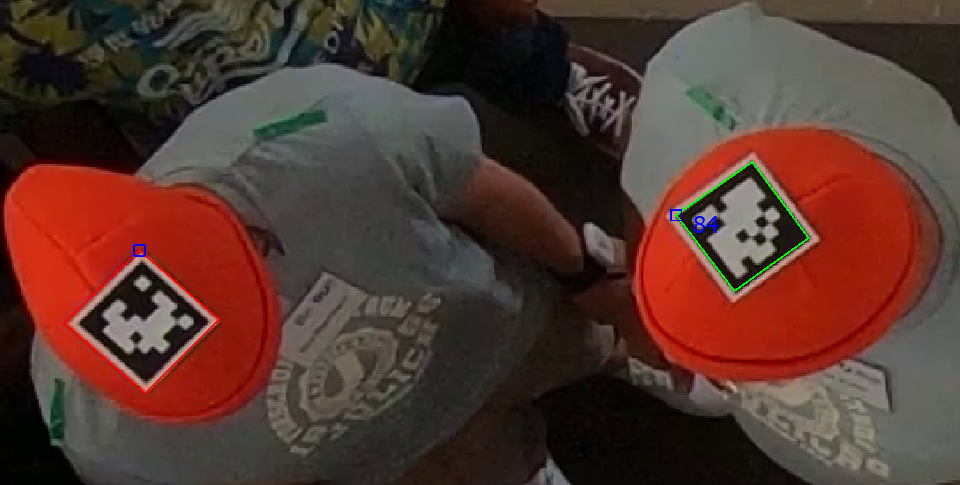
Visualization of code marker candidates. Successful detections are green and show the id of the marker. Candidates which did not result in a detection, because of an unreadable code, are shown in red. Accordingly, without id. For successful detections, PeTrack marks the upper left corner according to the orientation of the marker.#
Extra export options#
The usage of the code marker enables two new export options to be enabled:
add marker id
Adds the id of the detected code marker to the txt exportadd head direction
The code marker has a fixed orientation. Therefore, its orientation can be detected and exported. If care is given that the orientation of the marker aligns with the orientation of the pedestrian head, this is a measurement of the head view direction.