

Trajectory Import and Export#
PeTrack supports a few custom trajectory formats. These formats can be exported from PeTrack as well as re-imported into PeTrack.
TRC-File#
The .trc files are the internal trajectory file format from PeTrack. They are not meant for consumption by any other program but PeTrack and no guarantees on the stability of the format are made.
The .trc files can be exported and imported. They are the only files that contain all information PeTrack has about a trajectory and therefore the only files which recreate the original trajectories perfectly in import.
When a .trc file is exported, its project associated itself with it. If PeTrack finds the file when the project is opened again, it is imported automatically. For finding the file PeTrack uses both, the absolute path to the file as well as the relative path of the .trc file to the .pet project file.
Note
Export options do not apply to .trc files.
World-Coordinate File Formats#
TXT-File#
The .txt file is the current main export target for external consumption of the trajectories (e.g. for analysis). The basic format of a .txt file is the following:
# PeTrack project: multicolor.pet
# raw trajectory file: multicolor_truth_selbst.trc
# framerate: 25 fps
# z: can be 3d position or height of person (alternating or not)
# id frame x/m y/m z/m
1 0 13.7271 1.02799 1.58
1 1 13.7288 1.03453 1.58
1 2 13.7288 1.03453 1.58
1 3 13.7293 1.03445 1.58
1 4 13.7242 1.02797 1.58
...
The file starts with a header of comments, all of which start with an #. These contain the used PeTrack project file, the .trc file containing the raw trajectories, the fps of the video or image sequence and a small explanation what variables are listed in what order.
That is followed by all values, each data point being in one line and containing space separated values.
The information you see in the example above is part of any exported .txt file. Depending on the used marker, you can enable even more data to be added to the .txt file.
HDF5-File#
HDF5 is the next-gen file format for exporting trajectories for external comsumption (e.g. for analysis with PedPy).
It exports the trajectories along with PeTrack metadata as a .h5 file. Look at the HDF5 format documentation
for further information on the data format.
Export Options#
PeTrack has a lot of export options. They either add output to the exported file or perform some additional calculation on export. The export options only apply for world-coordinate file formats.
- insert miss. frames
When this option is enabled, PeTrack uses an algorithm to detect frame drops. These dropped frames are then inserted into the export. The position on these dropped frames is linearly interpolated. If this has already been calculated once, the checkbox
calculatedin the sectionmissing frameswill be checked. These missing frames are going to be reused in the next export. If you want the missing frames to be re-computed on export, you can press reset there.
Note
The calculation of missing/dropped frames is expensive. If you know there are no frame drops in your video, let this option disabled.
- recalc. height
This option is only relevant for projects using a stereo camera. This recalculates the height of the pedestrian using the median height of the measured 3D points.
- alt. height
This options allows
zto alternate. This is relevant when alternating height information is available (e.g. when using stereo) and the pedestrians are not at the same height for the whole recording. This could be the case e.g. at staircases. If disabled allzcoordinates are just the height of the pedestrian.- elim. tp. wo. hgt.
This option discards points for which no height was measured. This option only takes effect if
alt. heightis also selected. Note that PeTrack prints a warning for each discarded point, so remember to save the output of PeTrack during the export into a log file.- elim. trj. wo. hgt.
This option discards all trajectories which include a point for which no height was measured. This option only takes effect if
alt. heightis also selected. Note that PeTrack prints a warning for each discarded trajectory, so remember to save the output of PeTrack during the export into a log file.- smooth
This option smooths the
zcomponent of trajectories. This has no real effect ifalt. heightis not enabled.
Warning
The smooth option changes the trajectories in-place! That is, when trajectories are exported multiple times with this option enabled, they are also smoothed multiple times!
- add head direction
Adds the head direction to the
.txtfile. Head directions can be extracted for different markers. From the currently recommended markers, the code marker as well as the combined multicolor and code marker support this export option. The head direction is saved as a vector with the entires:viewDirXandviewDirY- add angle of view
Adds the angle between the line from the camera to the point and the line from the camera perpendicularly to the ground in radians
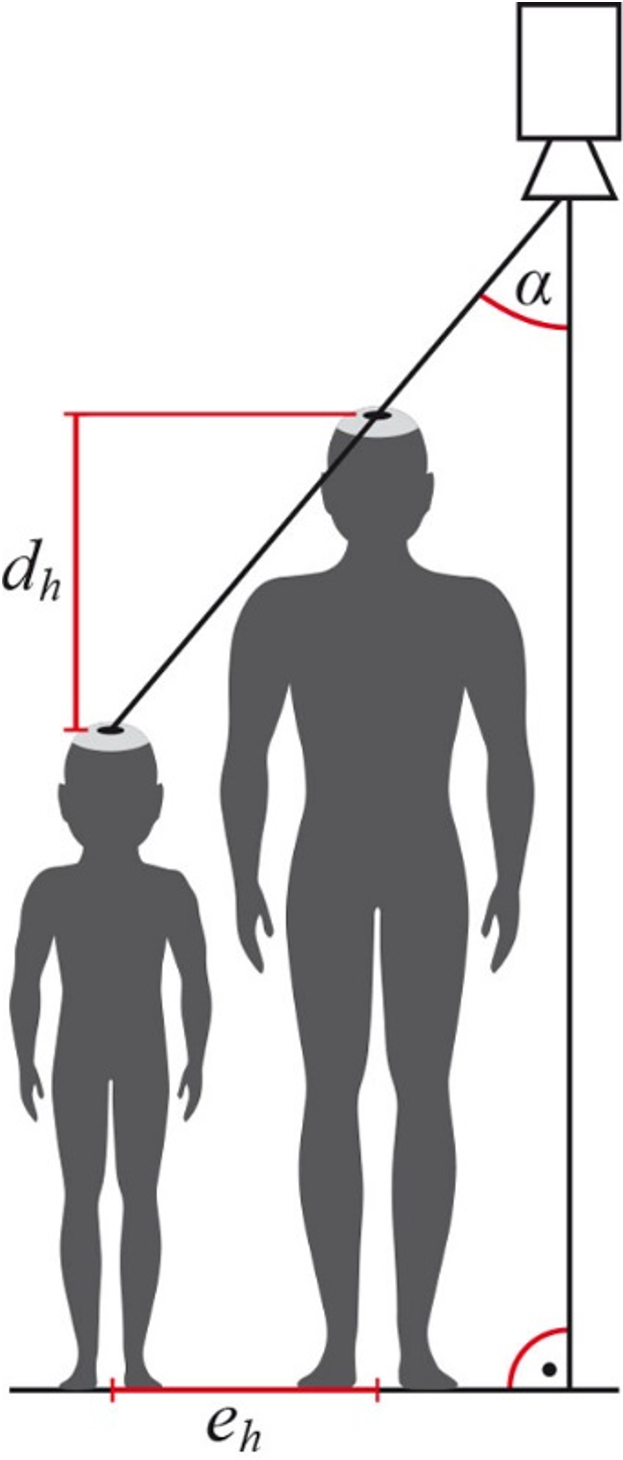
The angle alpha in this figure is the angle that is exported by the option add angle of view#
- use meter
Use meter in export instead of centimeter. (Recommended)
- add comment
PeTrack allows to attach comments to pedestrians (
right mouse button > Edit comment). Enabling this option exports these comments as well- add marker ID
Adds the ID of code markers to the export as well. Note that the ID of the person will be put at every point in the trajectory, not only at the points at which the marker was recognized